VSCode 篇
1、使用 jetbrains 快捷键需删除以下快捷键防止冲突
- Debug:Start Without Debugging —— Control-D —— 弹出 Debug
2、VSCode 推荐的插件
共同
| 序号 | 插件 id | 插件名 | 插件备注 |
|---|---|---|---|
| 1 | ms-dotnettools.vscode-dotnet-runtime | .NET Install Tool | dotnet 语言支持 |
| 2 | shezhangzhang.antd-design-token | antd Design Token | antd token 插件 |
| 3 | drcika.apc-extension | Apc Customize UI++ | 自定义页面 UI |
| 4 | formulahendry.auto-close-tag | Auto Close Tag | 自动闭合标签 |
| 5 | steoates.autoimport | Auto Import | 自动 import 导入 |
| 6 | formulahendry.auto-rename-tag | Auto Rename Tag | 同步重命名标签 |
| 7 | wraith13.bracket-lens | Bracket Lens | 闭合标签位置展示当前块信息 |
| 8 | ms-vscode.cpptools | C/C++ | c/c++ 语言支持 |
| 9 | ms-dotnettools.csharp | C# | C# 语言支持 |
| 10 | xaver.clang-format | Clang-Format | c 语言格式化 |
| 11 | formulahendry.code-runner | Code Runner | 运行代码文件 |
| 12 | streetsidesoftware.code-spell-checker | Code Spell Checker | 单词拼接检测 |
| 13 | coderabbit.coderabbit-vscode | CodeRabbit | 代码 review |
| 14 | adpyke.codesnap | CodeSnap | 美化代码块截图 |
| 15 | openai.chatgpt | Codex – OpenAI’s coding agent | codex 插件 |
| 16 | naumovs.color-highlight | Color Highlight | 直观看到颜色编码的对应颜色 |
| 17 | wallabyjs.console-ninja | Console Ninja | console 管理工具 |
| 18 | ms-azuretools.vscode-containers | Container Tools | docker 工具, 配置代码补全, 容器管理等 |
| 19 | pranaygp.vscode-css-peek | CSS Peek | 快速跳转到 css 定义位置 |
| 20 | mkloubert.vs-deploy | Deploy | 通过配置同时部署多个服务器 |
| 21 | ms-vscode-remote.remote-containers | Dev Containers | 通过进入 docker 统一系统环境 |
| 22 | ms-azuretools.vscode-docker | Docker | docker 扩展 |
| 23 | docker.docker | Docker DX | dockerfile 语法高亮和容器管理 |
| 24 | mikestead.dotenv | DotENV | env 语法支持 |
| 25 | hediet.vscode-drawio | Draw.io Integration | draw.io 集成 |
| 26 | editorconfig.editorconfig | EditorConfig | .editorconfig 配置文件 |
| 27 | irongeek.vscode-env | ENV | .env 高亮和格式化 |
| 28 | usernamehw.errorlens | Error Lens | error 信息行内显示 |
| 29 | dbaeumer.vscode-eslint | ESLint | eslint 校验 |
| 30 | mkxml.vscode-filesize | filesize | 底部状态栏显示文件大小 |
| 31 | donjayamanne.githistory | Git History | git 历史记录 |
| 32 | github.vscode-github-actions | GitHub Actions | github actions 管理 |
| 33 | github.vscode-pull-request-github | GitHub Pull Requests | pr 管理 |
| 34 | github.remotehub | GitHub Repositories | 远程 git 仓库 |
| 35 | avanlan.gitlenss | GitLenss for AvanLan | gitlen 调整版本 |
| 36 | cesium.gltf-vscode | glTF Tools | 模型预览工具 |
| 37 | mquandalle.graphql | GraphQL | .gql 或 graphaql 语法高亮 |
| 38 | stephanvs.dot | Graphviz (dot) language support for Visual Studio Code | GraphViz (dot) 语法支持 |
| 39 | efanzh.graphviz-preview | Graphviz Preview | Graphviz 预览 |
| 40 | ms-vscode.hexeditor | Hex Editor | 二进制编辑器 |
| 41 | kisstkondoros.vscode-gutter-preview | Image preview | 图片预览 |
| 42 | wix.vscode-import-cost | Import Cost | 显示包的体积 |
| 43 | oderwat.indent-rainbow | indent-rainbow | 彩色缩进 |
| 44 | k–kato.intellij-idea-keybindings | IntelliJ IDEA Keybindings | idea 风格的快捷键 |
| 45 | firsttris.vscode-jest-runner | Jest / Vitest Runner | 单元测试扩展辅助 |
| 46 | andys8.jest-snippets | Jest Snippets | jest 代码片段 |
| 47 | jinno.codelens-sample | Jinno: Live Preview React components with AI. For React, NextJS and Javascript to develop better design systems. | 预览 react 组件 |
| 48 | cmstead.js-codeformer | JS CodeFormer: Javascript Refactoring & Code Automation | 重构 js 代码 |
| 49 | aykutsarac.jsoncrack-vscode | JSON Crack | json 文件可视化 |
| 50 | wanfu.jump-to-alias-file | Jump To Alias File | 别名跳转 |
| 51 | ms-kubernetes-tools.vscode-kubernetes-tools | Kubernetes | k8s 插件 |
| 52 | redhat.java | Language Support for Java(TM) by Red Hat | java 语言支持 |
| 53 | leetcode.vscode-leetcode | LeetCode | leetcode 刷题 |
| 54 | ritwickdey.liveserver | Live Server | 本地预览服务器 |
| 55 | ms-vsliveshare.vsliveshare | Live Share | 实时分享 |
| 56 | yzhang.markdown-all-in-one | Markdown All in One | 增强预览 目录 等 |
| 57 | shd101wyy.markdown-preview-enhanced | Markdown Preview Enhanced | 支持导出 md 文件为 pdf 等 |
| 58 | pkief.material-icon-theme | Material Icon Theme | 图标主题 |
| 59 | unifiedjs.vscode-mdx | MDX | mdx 语法支持 |
| 60 | tomoyukim.vscode-mermaid-editor | Mermaid Editor | Mermaid 编辑 |
| 61 | bpruitt-goddard.mermaid-markdown-syntax-highlighting | Mermaid Markdown Syntax Highlighting | 语法高亮 |
| 62 | nuxtr.nuxtr-vscode | Nuxtr | Nuxt 项目的“脚手架/命令/项目管理工具” |
| 63 | quicktype.quicktype | Paste JSON as Code | 将 json 转 ts 类型 |
| 64 | christian-kohler.path-intellisense | Path Intellisense | path 路径补全优化 |
| 65 | mathematic.vscode-pdf | PDF Viewer | pdf 预览 |
| 66 | johnpapa.vscode-peacock | Peacock | 配置不同的窗口栏颜色 |
| 67 | xdebug.php-debug | PHP Debug | PHP debug |
| 68 | esbenp.prettier-vscode | Prettier - Code formatter | pretter 插件 |
| 69 | prisma.prisma | Prisma | Prisma 数据库语法支持及扩展 |
| 70 | alefragnani.project-manager | Project Manager | 多项目管理工具 |
| 71 | wallabyjs.quokka-vscode | Quokka.js | 实时运行代码, 行内显示结果 |
| 72 | iceworks-team.iceworks-style-helper | React Style Helper | react style 组件语法支持 |
| 73 | styx11.react-intl-linter | react-intl-linter | react 国际化未翻译中文识别及翻译插件 |
| 74 | chrmarti.regex | Regex Previewer | 正则可视化预览 |
| 75 | ms-vscode-remote.remote-ssh | Remote - SSH | 把远程主机当成开发环境 |
| 76 | ms-vscode-remote.remote-ssh-edit | Remote - SSH: Editing Configuration Files | remote ssh 语法高亮及补全 |
| 77 | ms-vscode.remote-explorer | Remote Explorer | 侧边栏展示远程列表 |
| 78 | ms-vscode.remote-repositories | Remote Repositories | 不用 clone 即可快速插件 github 的代码和小修改文件 |
| 79 | rust-lang.rust-analyzer | rust-analyzer | rust 语法高亮 |
| 80 | syler.sass-indented | Sass (.sass only) | sass 语法支持 |
| 81 | renesaarsoo.sql-formatter-vsc | SQL Formatter VSCode | sql 语法相关的格式化工具 |
| 82 | sysoev.language-stylus | stylus | Stylus .styl 语法高亮、补全、symbols、颜色预览 |
| 83 | simonsiefke.svg-preview | Svg Preview | svg 预览 |
| 84 | bradlc.vscode-tailwindcss | Tailwind CSS IntelliSense | Tailwind CSS 官方智能提示、hover、lint、语法高亮 |
| 85 | wayou.vscode-todo-highlight | TODO Highlight | todo 注释高亮 |
| 86 | gruntfuggly.todo-tree | Todo Tree | 列出 todo 的列表 |
| 87 | pflannery.vscode-versionlens | Version Lens | package 版本信息显示 |
| 88 | vscodevim.vim | Vim | vim 支持 |
| 89 | antfu.vite | Vite | vite 插件 |
| 90 | vue.volar | Vue (Official) | vue 官方插件 |
| 91 | misterj.vue-volar-extention-pack | Vue Extension Box | vue 相关的组合包, 同时安装多个插件, 卸载也会同时卸载 |
| 92 | wakatime.vscode-wakatime | WakaTime | coding 时间记录 |
| 93 | wallabyjs.wallaby-vscode | Wallaby.js | 改代码时自动跑受影响的测试 |
| 94 | raczzalan.webgl-glsl-editor | WebGL GLSL Editor | glsl 文件编辑 |
| 95 | ms-vscode-remote.remote-wsl | WSL | Windows 上用 VS Code 进入 WSL/Linux 环境开发 |
| 96 | qiu8310.minapp-vscode | WXML - Language Service | 微信小程序 WXML/WXSS 语言支持、补全等 |
| 97 | redhat.vscode-xml | XML | 完整 XML 语言支持:格式化、校验、补全、自动闭合标签、outline、folding、DTD/XSD、schema 支持等 |
| 98 | redhat.vscode-yaml | YAML | YAML 语言服务:校验、补全、schema、Kubernetes 支持 |
VSCode
暂无
Cursor
| 序号 | 插件 id | 插件名 | 插件备注 |
|---|---|---|---|
| 1 | keg1255.cursorpool | Cursor激活 | cursor 第三方激活工具 |
不常用
| 插件名 | 描述 |
|---|---|
| Amazon Q | |
| Biome | 开箱即用的校验&格式化&排序一体插件 |
| Bito AI Code Reviews | |
| Cline | |
| Cody: AI Code Assistant | AI 编程助手 |
| Continue | 代码补全助手, 并有类似 Cursor 核心的行内编辑功能 |
| Qoder CN (Formerly Lingma) | 通义 ai 代码提示生成 |
| Rome | Rome 格式化工具 |
| Roo Code | |
| TRAE AI: Coding Assistant | 自动补全工具 |
| uni-app-schemas | |
| uni-app-snippets | |
| uni-cloud-snippets | |
| uni-helper | |
| uni-highlight | |
| uni-ui-snippets | |
| MarsCode: AI Coding Assistant | Trae 豆包旗下的编程助手 |
| augment | 类似 cursor 和 Claude code 的 compose 插件 |
3、其他
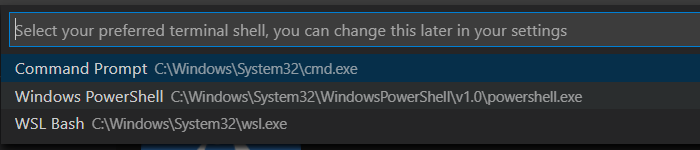
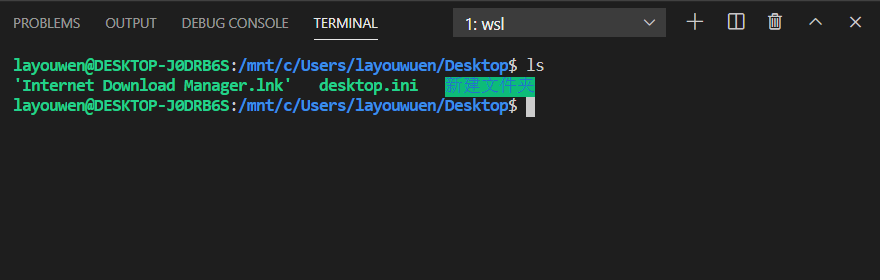
3.1 使用 WSL 的 Linux 终端
- 安装 Remote - WSL 插件
- 打开终端,选择 WSL Bash
3.1.1 Windows 访问 Ubuntu 的文件系统
1 | C:\Users\xxx\AppData\Local\Packages\CanonicalGroupLimited.UbuntuonWindows_79rhkp1fndgsc\LocalState\rootfs\home\xxx |
3.1.2 Ubuntu 访问 Windows 的 home 目录
创建链接
1 | ln -s /mnt/c/User/用户名 ~/win10 |
使用链接 cd 进入 home 目录
1 | cd ~/win10 |
4、插件使用技巧
JavaScript standardjs styled snippets
cd - const x = await x
cf - const 箭头函数
te - 三元表达式
i - if 语句
ife - if else 语句
tc - try catch
tcf - try catch finally
fn - function 函数
asf - async function 函数
aiife - async 立即执行函数
JavaScript (ES6) code snippets
class
con - 生成构造函数
met - 类中生成方法
pge - get 函数
pse - set 函数
基本
fof - for…of 方法
fin - for…in 方法
nfn - const 箭头函数
sti - setInterval 定时器
sto - setTimeout 定时器
prom - return new Promise
ec —— 导出 const 变量
ef —— 导出函数
1 | export function name (arguments) {} |
log 类
cer - console.error
clg - console.log
导出
ecl —— 默认导出类
1 | export default class ClassName {} |
Simple React Snippets
uef
1 | useEffect(()=>{},[]) |
ucb
1 | useCallback((val)=>{},[]) |
usf
1 | const [,set] = useState() |
keybindings
- 上移窗口
- 下移窗口
- 左移窗口
- 右移窗口
- 上下分割窗口
- 左右分割窗口
- 创建文件
- 关闭编辑区
- 取消高亮
- 重命名
- 格式化
- 折叠代码
- 回到开头
- 回到结尾
- 合并下一行
- 向下5行
- 向上5行
1 | /* mac start */ |
通过 vim 快速删除 import 中的其中一个模块
1 | "vim.argumentObjectOpeningDelimiters": [ |
快捷键 daa 删除, 可以应用在数组, 对象, 函数参数中
代码片段
1 | { |
1 | { |